- Follow On:
- [email protected]
- +918655715397
- Thane west, Maharashtra - 400604

Businesses across industries are entering a new era of digital transformation where speed, accuracy, and automation have become critical for success. Manual processes that once consumed hours of employee time are now being replaced by intelligent technologies that improve productivity and operational efficiency.
One of the most impactful technologies driving this change is Robotic Process Automation (RPA).RPA enables organizations to automate repetitive and rule-based tasks using software robots that work across different applications, systems, and databases. These digital workers can perform tasks faster, reduce errors, and allow employees to focus on higher-value activities.
In 2026, RPA is evolving beyond simple automation. With the integration of Artificial Intelligence (AI), Machine Learning, and advanced analytics, businesses are adopting Intelligent Process Automation, AI Workflow Automation, and Autonomous Business Processes to create smarter and more scalable operations.
From finance and accounting to healthcare, manufacturing, HR, and customer service, RPA is becoming an essential part of modern business strategies.
Robotic Process Automation (RPA) is a technology that uses software bots to automate repetitive digital activities that are normally performed manually by employees.
These bots can interact with business applications just like humans. They can open systems, enter information, extract data, process transactions, and complete workflows automatically.
Unlike traditional automation, RPA does not always require major changes to existing systems. It works on top of current applications and helps businesses automate processes quickly.
In 2026, businesses are moving from basic RPA automation toward intelligent automation solutions that combine automation with AI capabilities.
This allows organizations to:
Modern businesses face challenges such as increasing operational costs, growing customer expectations, and complex compliance requirements.
RPA helps organizations overcome these challenges by creating faster and more efficient workflows.
Businesses are investing in RPA because it supports:
RPA plays an important role in helping companies modernize their operations without completely replacing existing technology systems. Organizations can gradually automate processes and create a strong foundation for future AI transformation.
Automation reduces manual intervention and enables processes to run faster with fewer delays.
For example:
A finance team that manually processes hundreds of invoices every month can use RPA for invoice processing to automatically extract information, verify details, and update accounting systems.
When repetitive tasks are automated, employees have more time to focus on:
RPA helps companies reduce operational expenses by minimizing repetitive manual work and improving resource utilization.
Human errors in data entry and reporting can create business risks.
RPA improves:
RPA works through software bots that follow predefined instructions to complete business tasks.
The RPA workflow generally includes four major stages:
Businesses first analyze their existing processes and identify tasks suitable for automation.
Ideal RPA processes are usually:
Examples:
After selecting a process, automation specialists create workflows that define:
Developers create bots using RPA platforms and test them to ensure:
Testing helps identify errors before deployment.
After successful testing, bots are deployed into business operations.
Organizations continuously monitor:
This helps improve automation efficiency over time.
RPA provides measurable benefits for businesses of all sizes.
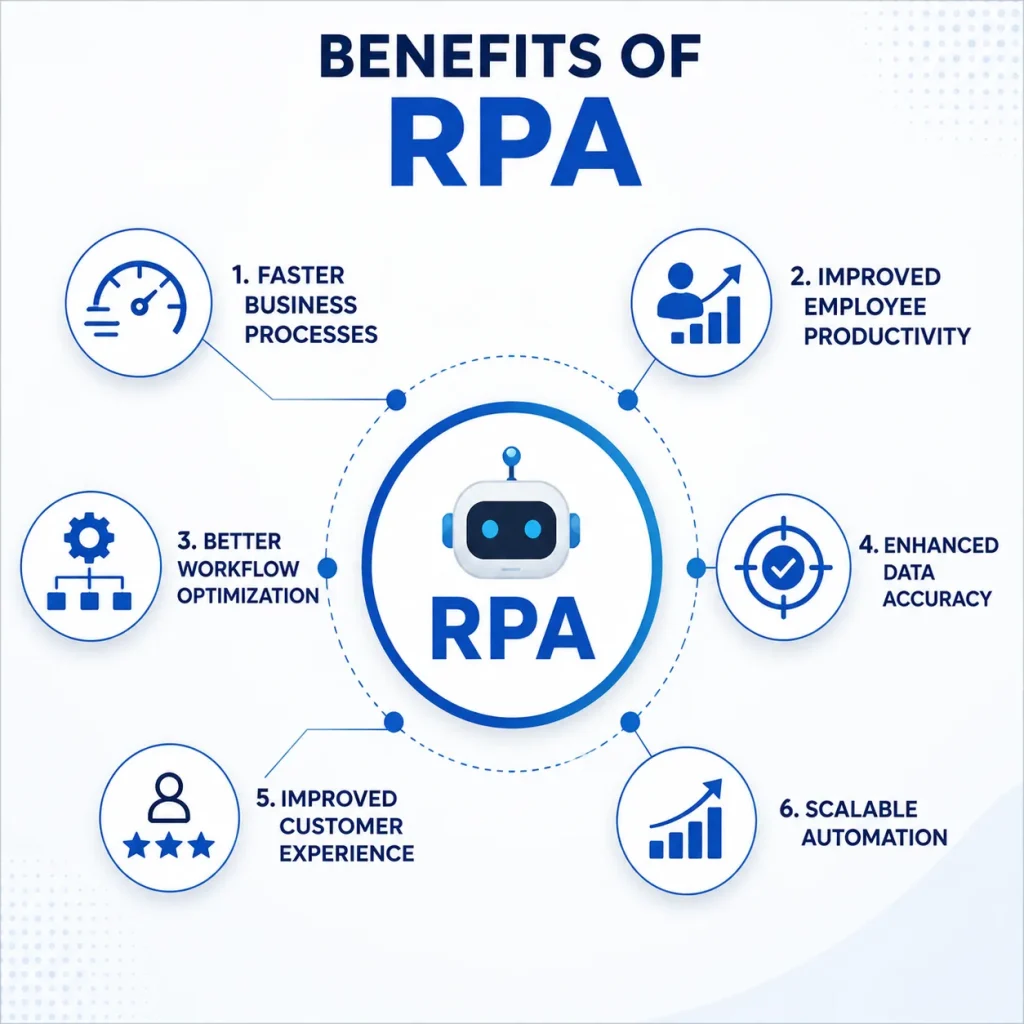
Software robots can complete repetitive tasks much faster than manual processing.
For example:
A task that takes employees several hours can often be completed within minutes through automation.
Employees no longer need to spend valuable time on repetitive administrative activities.
They can focus on:
RPA helps organizations analyze existing processes and remove unnecessary steps.
This improves overall process efficiency.
Automation reduces mistakes caused by manual data entry.
This improves:
Faster processing means customers receive quicker responses and better service.
Businesses can expand automation across multiple departments as operations grow.
The future of RPA is moving toward intelligent and autonomous automation.
Businesses are no longer looking only for task automation. They are building complete automated ecosystems.
AI integration allows RPA systems to handle more complex processes.
Examples:
AI Workflow Automation combines artificial intelligence with automation workflows to create smarter business processes.
For example:
An AI-powered invoice system can:
Intelligent Process Automation combines:
It enables organizations to automate complete business processes instead of individual tasks.
The future of enterprise automation is moving toward self-managed processes.
These systems can:
Leading RPA platforms include:
These tools support:
Robotic Process Automation is no longer limited to IT departments. Organizations across multiple industries are implementing RPA to improve efficiency, reduce operational costs, and create smarter business processes.
From healthcare providers managing patient records to manufacturers optimizing supply chains, RPA is helping companies achieve better process control and business productivity.
Let’s explore some important Robotic Process Automation examples across industries.
Healthcare organizations handle large amounts of sensitive data, documentation, and administrative processes every day. Manual processing can lead to delays and errors.
RPA in healthcare helps automate administrative and operational activities, allowing healthcare professionals to focus more on patient care.
For example, an RPA bot can automatically collect patient information, verify insurance details, and update healthcare systems without manual intervention.
Manufacturing companies operate complex processes involving inventory, suppliers, production planning, and quality control.
RPA for manufacturing helps businesses automate repetitive operational tasks and improve supply chain efficiency.
By implementing process automation, manufacturers can reduce delays, improve visibility, and optimize their workflows.
Human Resource departments manage thousands of employee-related activities, many of which involve repetitive administrative work.
Robotic Process Automation in HR helps companies automate employee lifecycle processes.
For example, during employee onboarding, RPA can automatically:
Invoice processing is one of the most common areas where businesses implement RPA automation.
Traditional invoice management involves:
These activities consume significant employee time and can create errors.
With RPA for invoice processing and AI Invoice Processing, businesses can automate the complete invoice lifecycle.
Finance departments are among the biggest adopters of RPA because they manage large volumes of repetitive transactions.
Common finance automation areas include:
RPA allows finance teams to move from manual processing toward strategic financial analysis.
A successful automation project requires proper planning and execution.
The RPA lifecycle includes multiple stages that help organizations implement automation successfully.
The first step is identifying processes that are suitable for automation.
Businesses analyze:
The best automation candidates usually have:
Before implementing RPA, organizations need a clear automation strategy.
This includes:
A strong strategy ensures automation supports business objectives.
During this stage, developers create automation workflows.
The bot is configured to:
Developers also define exception-handling rules for situations where human involvement is required.
Testing ensures automation works accurately before deployment.
Organizations test:
Proper testing reduces business risks.
After successful testing, RPA bots are deployed into live business environments.
Employees are trained to:
RPA does not replace employees; it supports them by removing repetitive workload.
Automation performance should be reviewed regularly.
Businesses track:
Continuous improvement helps organizations achieve long-term automation success.
Digital transformation is about using technology to improve business operations, customer experiences, and decision-making.
RPA acts as a foundation for digital transformation by connecting existing systems and automating processes without major infrastructure changes.
Businesses use RPA to achieve:
Organizations create standardized and efficient workflows.
Companies gain better visibility into operations and improve process control.
AI-powered automation enables smarter decisions.
Organizations can scale automation across multiple departments.
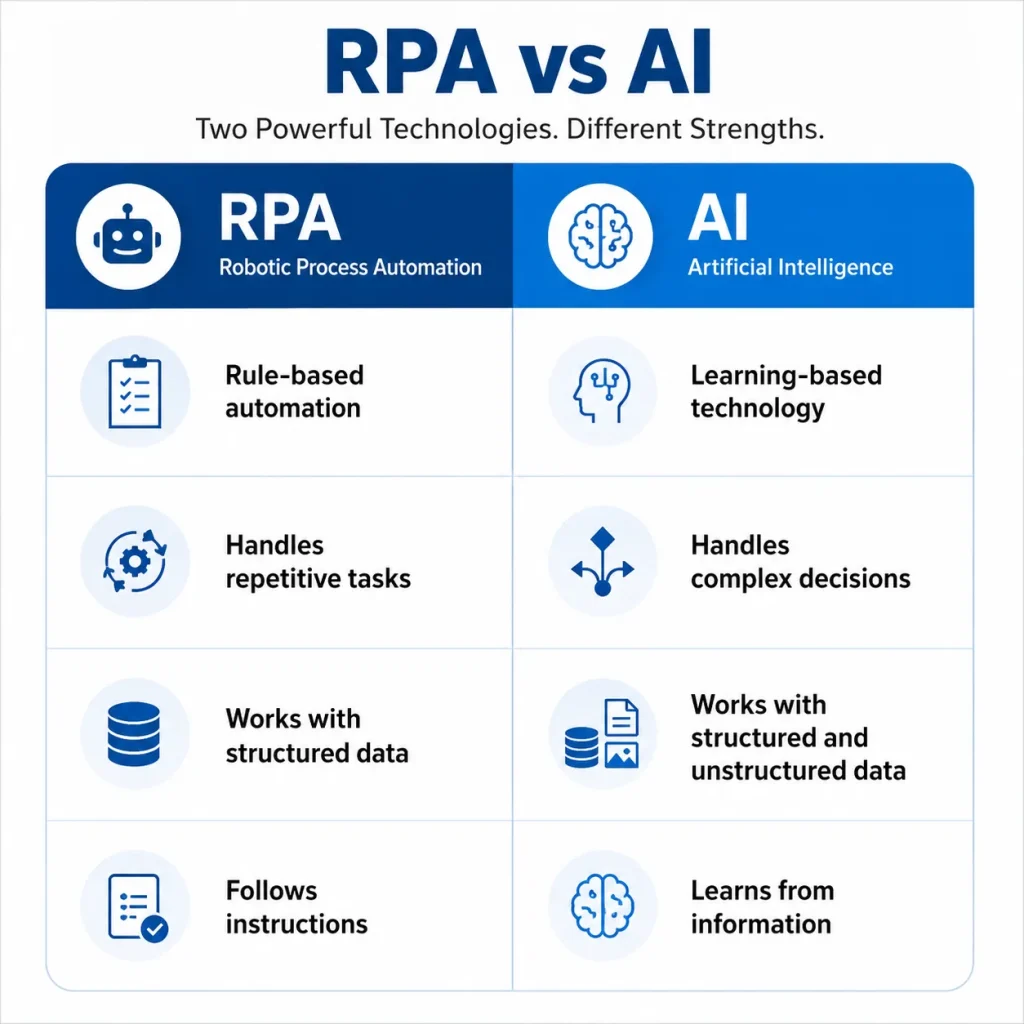
A common question businesses ask:
Yes, RPA and Artificial Intelligence are different technologies, but they work together to create intelligent automation solutions.
RPA follows predefined rules and instructions.
Examples:
AI can learn, analyze information, and make decisions.
Examples:
Implementing RPA successfully requires more than selecting automation software.
Businesses should follow a strategic approach.
Start with processes that provide maximum business value.
Examples:
Organizations should begin with pilot automation projects.
After achieving success, automation can be expanded across departments.
The right automation partner helps businesses with:
Businesses should evaluate:
The future of RPA is focused on creating intelligent and self-improving business environments.
Organizations are moving from simple task automation toward complete process automation.
Future trends include:
Businesses that adopt RPA as part of their automation strategy can achieve stronger operational efficiency, improved customer experiences, and long-term competitive advantages.
Robotic Process Automation has become a key technology for organizations looking to improve efficiency, reduce costs, and accelerate digital transformation.
In 2026, RPA is no longer just about automating repetitive tasks. With AI integration, intelligent automation, and advanced workflow optimization, businesses can create smarter, faster, and more scalable operations.
From healthcare and manufacturing to finance and HR, RPA helps organizations improve:
Companies that develop a clear automation strategy today will be better prepared for the future of intelligent and autonomous business processes.
Robotic Process Automation (RPA) is a technology that uses software bots to automate repetitive business tasks such as data entry, reporting, invoice processing, and workflow management.
RPA works by using software robots that interact with applications and systems to complete predefined tasks automatically. Bots follow workflow instructions to process information, transfer data, and complete business activities.
The major benefits of RPA include:
RPA is used across industries including:
Yes. RPA automates rule-based tasks, while AI enables machines to learn, analyze information, and make intelligent decisions. Together, they create intelligent process automation.
Yes. Small and medium businesses can use cloud-based RPA solutions to automate repetitive tasks without making large technology investments.
Common examples include:
The future of RPA includes AI automation, intelligent workflows, autonomous business processes, and scalable digital workforce solutions that help organizations achieve continuous improvement.
Subscribe to our newsletter and stay updated.